
Server management software for WordPress
WordPress server management in your own cloud account
WPShift sets up a server for WordPress in your cloud account and gives you one dashboard for the sites on it. Your provider bills you for the server, at their price. WPShift bills you for the software.
Free plan available. Paid plans include a 7-day trial. Server costs are separate.
Your cloud provider
For the server
DigitalOcean, Hetzner, Linode, AWS, Google Cloud or Vultr
Cloud server, the size and region you chose their price
Added by WPShift €0,00
Paid to your provider. The server stays in your account.
WPShift
For the software
Free plan€0
WordPress sites1
Servers1
Mailboxes1
Backup storage512 MB
Solo plan€5,99
WordPress sites3
Servers1
Mailboxes3
Backup storage2 GB
Studio plan€14,99
WordPress sites15
Servers3
Mailboxes15
Backup storage4 GB
Scale plan€29,99
WordPress sitesUnlimited
ServersUnlimited
MailboxesUnlimited
Backup storage10 GB
Per month, excluding VAT.
The dashboard
Connect an account at
- DigitalOcean
- Hetzner
- Linode
- AWS
- Google Cloud
- Vultr
Setup
You connect the account. WPShift sets up the server.
A first server takes three steps, and WPShift does the second one. You do not need Linux experience, and SSH access is there when you want it.
-
Connect your cloud account
Add an API key for your provider, then choose where the server runs and which size to use. The account stays yours.
-
WPShift sets up the server
The software is installed and the security settings are applied as one setup. Each step and its result is shown as it runs.
Installed and configured in step 2
- Nginx
- serves the pages
- PHP
- runs WordPress
- MariaDB
- stores the content
- Redis
- keeps frequently used data in memory
- Firewall
- denies incoming traffic except HTTP, HTTPS and SSH
- SSH
- access by key
- Each site
- its own system user, directory and database credentials
-
Add your WordPress sites
Install a new site or migrate an existing one. After that you manage its settings, backups and updates from the dashboard.
Costs
What WPShift costs
Your plan covers the WPShift software. A server in your own cloud account is billed by your provider, at their price. If you would prefer not to run a cloud account, you can buy a server through WPShift Cloud.
| Plan | A month | Sites | Servers | Mailboxes | Backup storage |
|---|---|---|---|---|---|
| Free | €0 | 1 | 1 | 1 | 512 MB |
| Solo | €5,99 | 3 | 1 | 3 | 2 GB |
| Studio | €14,99 | 15 | 3 | 15 | 4 GB |
| Scale | €29,99 | Unlimited | Unlimited | Unlimited | 10 GB |
Per month, excluding VAT. Server costs are separate.
If you stop using WPShift, a server in your own cloud account stays there and keeps running.
What ends is the management around it: DNS, mailboxes, backups and monitoring. Check which of those you rely on before you cancel.
After launch
The work that comes after launch
Install sites, manage plugins and themes, make staging copies and check backups from one place. Keep domains and mailboxes there too, or point the domain at the providers you already use.
-
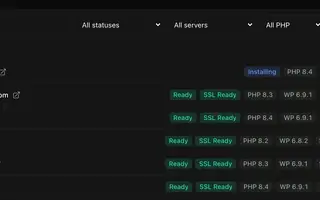 Site management Settings, plugins, themes and logs for every site, in one list.
 -
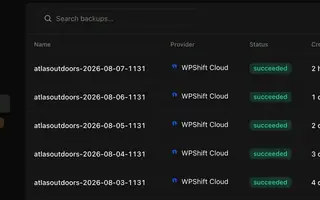 Backups On a schedule you set, stored away from the server, restorable to the same site or another.
 -
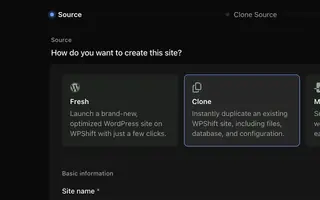 Staging & cloning Copy a site and test the update there first.
 -
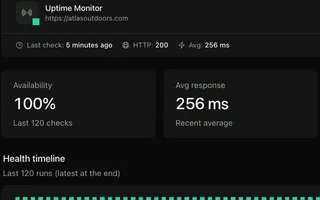 Uptime monitoring Each site requested from outside its server, every five minutes by default.
 -
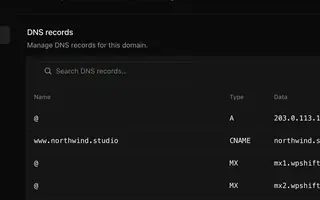 Domains & DNS Records that are created with a site and move with it.
 -
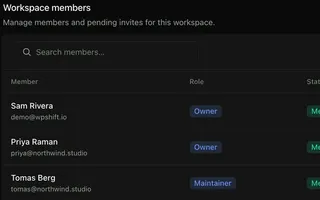 Team access A workspace per client and a login per person.
Moving in
Already have sites somewhere else?
The WPShift migration plugin copies your WordPress files and database to the new server. Your current site keeps serving visitors the whole time. You review the imported copy on a temporary address before you change your domain's DNS.
- 1Install the plugin
- 2Choose the server
- 3Copy the site
- 4Check the copy
- 5Switch the domain
Questions
Questions before you start
- Do I need to set up the server myself?
- No. You connect your cloud account and choose the server. WPShift installs and configures what WordPress needs. After that, routine hosting tasks are controls in the dashboard.
- Do I need to buy hardware?
- No. You rent a cloud server from a supported provider. It runs in your account and WPShift sets it up for you.
- Will my sites be faster?
- WPShift gives you page caching in the web server, Redis and a PHP version per site. Whether that is faster than what you have now depends on your current hosting, the server you choose and how the site is built. Migrate a copy and compare before you switch.
- Is it cheaper than my current hosting?
- It can be, particularly if you run several sites that can share a server. Compare your current total with a WPShift plan plus the server capacity you need, and include domains, storage and email on both sides.
- Can I keep using WordPress normally?
- Yes. Each site is a standard WordPress installation with its own admin, themes and plugins. WPShift manages the hosting underneath.
- What stays mine if I stop using WPShift?
- A server created in your own cloud account stays in that account and keeps running. The management around it stops, so check which WPShift services you depend on before you cancel: DNS, mailboxes, backups and monitoring. WPShift Cloud servers have separate billing terms.
Something else you want to know? Ask us
Start
Connect your cloud account
Choose a server, let WPShift set it up, and add your first WordPress site. The free plan covers one site on one server and needs no card.
Free plan available. Paid plans include a 7-day trial. Server costs are separate.