
WPShift vs FlyWP: two ways to run WordPress on your own servers
FlyWP connects to a server at DigitalOcean, AWS, Vultr or Hetzner, or to any custom server. WPShift sets up a server in your own cloud account and includes mailboxes on your own domains, DNS hosting and off-server backup storage on every plan.
Free plan available. Paid plans include a 7-day trial. Server costs are separate.
 WPShift
The dashboard
- Team access
- Copilot · Scale
WPShift bills the plan
sets up and manages
- Site
- Site
- Staging copy from Solo
Also managed in WPShift
- Backups stored off the server
- DNS records for domains you point at WPShift
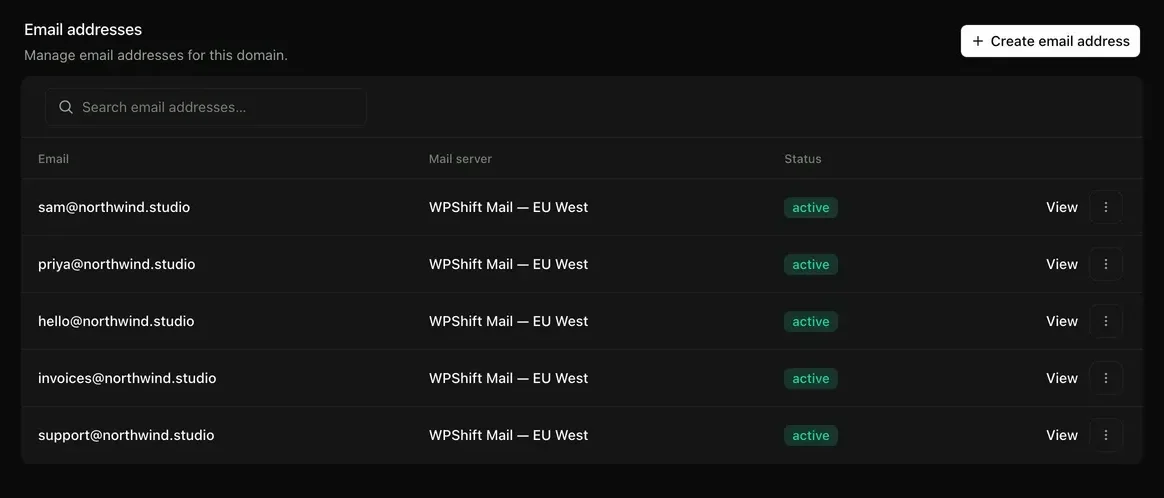
- Mailboxes on your own domain
- Uptime checks from outside the serverfrom Solo
- PageSpeed tests against the live sitefrom Studio
FlyWP's pricing page, read on 30 September 2026, mentions no mailbox hosting and offers DNS through a Cloudflare integration. The two also charge differently: FlyWP per server, WPShift per plan.
What this page says about FlyWP comes from flywp.com. The pricing model, the free tier and the DNS integration were read there on 30 September 2026. Check flywp.com for the current state.
Costs
How each one charges
WPShift
WPShift charges for a plan: Free €0, Solo €5,99, Studio €14,99 or Scale €29,99 a month, excluding VAT, with mailboxes, backup storage and DNS hosting included. A server in your own cloud account is billed by your provider, with nothing added by WPShift. A WPShift Cloud server is billed by WPShift.
FlyWP
A price per server, at a rate that falls as you add servers, with unlimited sites on each server.
per flywp.com, 30 September 2026
The differences
How the two differ
FlyWP: per flywp.com, 30 September 2026
Mailboxes on your own domain
WPShift
Included on every plan, including the free one, with webmail.
FlyWP
Not mentioned on their pricing page.
DNS hosting
WPShift
Free on every plan. The domain stays with your registrar.
FlyWP
DNS through an integration with Cloudflare.
Backup storage
WPShift
Included on every plan, off the server, with the allowance set by the plan. Or your own S3-compatible storage.
FlyWP
Not part of the free tier.
Where the server comes from
WPShift
Your cloud account, or a WPShift Cloud server billed by WPShift.
FlyWP
A server at DigitalOcean, AWS, Vultr or Hetzner, or any custom server you connect.
Free tier
WPShift
One WordPress site on one server, with a mailbox and 512 MB of backup storage.
FlyWP
One server and one site, with community support. Backups are not part of it.
Which one
Both lists are WPShift's own view.
When FlyWP suits better
- You run many small sites on one server and want only the server managed. A price per server with unlimited sites suits that.
When WPShift suits better
- You want mailboxes on your own domains. They are part of every WPShift plan.
- You want backup storage and DNS hosting included with the plan.
Free plan available. Paid plans include a 7-day trial. Server costs are separate.
In the dashboard
Questions
Questions about WPShift and FlyWP
- Which one costs less?
- That depends on how many sites share a server. A price per server with unlimited sites suits many small sites on one server. WPShift's plans are Free €0, Solo €5,99, Studio €14,99 and Scale €29,99 a month, excluding VAT, with mailboxes and backup storage included. Count the server, storage and email on both sides. The pricing page adds up a plan and a WPShift Cloud server. For a server in your own cloud account, add your provider's price to the plan price.
- Can I move from FlyWP to WPShift?
- Yes, by the same route as any migration. Install the WPShift migration plugin, copy the site to a WPShift-managed server, check the copy on a temporary address, and change DNS once it looks right. You do not have to share your FlyWP login.
More
Test a copy before you decide
Copy a site to a WPShift-managed server and check it on a temporary address. Your current setup keeps serving the live site until you move DNS.
Free plan available. Paid plans include a 7-day trial. Server costs are separate.