
WPShift vs Kinsta: a server of your own or a hosting plan
Kinsta sells WordPress hosting plans. WPShift is software that sets up a server in your own cloud account and manages the sites on it, along with DNS, mailboxes and backups for those sites.
Free plan available. Paid plans include a 7-day trial. Server costs are separate.
 WPShift
The dashboard
WPShift bills the plan
sets up and manages
- Site
- Site
- Staging copy from Solo
Also managed in WPShift
- Backups stored off the server
- DNS records for domains you point at WPShift
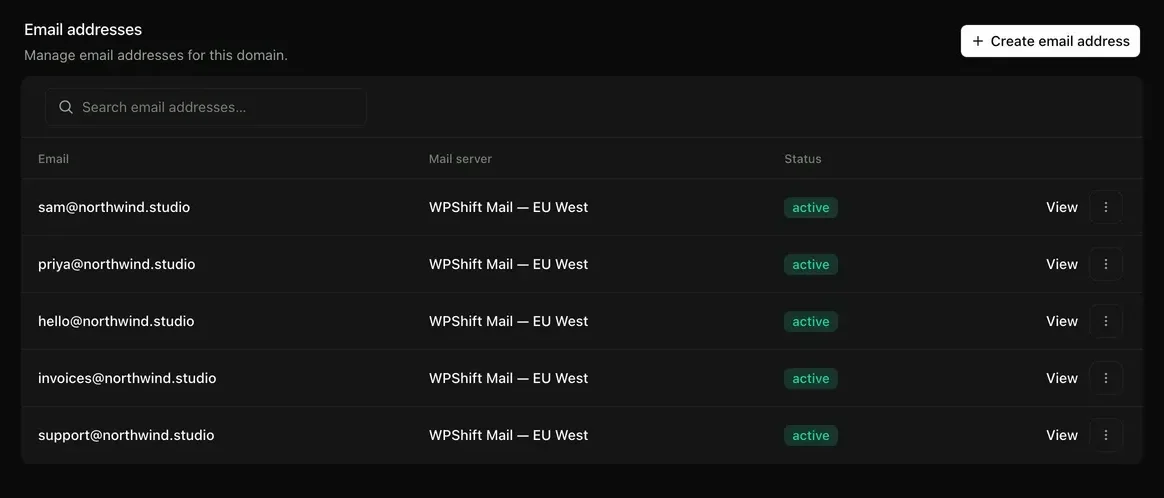
- Mailboxes on your own domain
- Uptime checks from outside the serverfrom Solo
- PageSpeed tests against the live sitefrom Studio
Two things differ most: email and support. Kinsta's documentation states that email is not part of its hosting plans. WPShift's support covers the platform and its infrastructure features, and does not work on the site itself.
What this page says about Kinsta comes from kinsta.com/pricing and kinsta.com/docs/email-hosting, read on 30 September 2026. Check kinsta.com for the current state.
Costs
How each one charges
WPShift
WPShift charges for a plan: Free €0, Solo €5,99, Studio €14,99 or Scale €29,99 a month, excluding VAT, with mailboxes, backup storage and DNS hosting included. A server in your own cloud account is billed by your provider, with nothing added by WPShift. A WPShift Cloud server is billed by WPShift.
Kinsta
Single-site and multi-site plans, limited by the number of WordPress installs, by storage, and by monthly visits or bandwidth.
per kinsta.com, 30 September 2026
The differences
How the two differ
Kinsta: per kinsta.com, 30 September 2026
WPShift
Mailboxes on your own domains are included on every plan, including the free one, with webmail.
Kinsta
Not part of the hosting plans. The documentation recommends Google Workspace, Microsoft 365 or Zoho Mail. Transactional email from the site is included.
Backups
WPShift
Scheduled per site and stored off the server, in the plan's storage or your own S3-compatible storage.
Kinsta
Included, with a retention period that grows by plan.
Staging
WPShift
Cloning a site to a staging copy, from the Solo plan.
Kinsta
Free staging environments on all plans.
What you buy
WPShift
A plan for the software. The server is created in your own cloud account and billed by your provider, or bought as a WPShift Cloud server.
Kinsta
A single-site or multi-site hosting plan.
How capacity is set
WPShift
You choose the server size. Your plan sets how many sites WPShift manages.
Kinsta
By plan: WordPress installs, storage, and monthly visits or bandwidth.
Which one
Both lists are WPShift's own view.
When Kinsta suits better
- You want one company accountable for the whole thing, with support that works on the site itself.
- Your traffic is large and comes in spikes, and you would prefer someone else to absorb that.
When WPShift suits better
- You want your mail and your sites in one place.
- You want the server in your own cloud account. If you stop using WPShift it stays there and keeps running, while DNS, mailboxes, backups and monitoring stop with the subscription.
Free plan available. Paid plans include a 7-day trial. Server costs are separate.
In the dashboard
Questions
Questions about WPShift and Kinsta
- Is WPShift cheaper than Kinsta?
- That depends on your Kinsta plan and on the server you would need. With WPShift you pay a plan (Free €0, Solo €5,99, Studio €14,99 or Scale €29,99 a month, excluding VAT) plus a server, and several sites can share that server within the plan's site allowance. Compare the two totals, and count domains, storage and email on both sides. The pricing page adds up a plan and a WPShift Cloud server. For a server in your own cloud account, add your provider's price to the plan price.
- How do I move a site from Kinsta?
- Install the WPShift migration plugin on the site and copy it to a WPShift-managed server. Check the copy on a temporary address while Kinsta keeps serving the live site. Orders and form entries that arrive between the copy and the DNS switch stay on the old site, so plan the switch around them.
More
Test a copy before you decide
Copy a site to a WPShift-managed server and check it on a temporary address. Your current setup keeps serving the live site until you move DNS.
Free plan available. Paid plans include a 7-day trial. Server costs are separate.